
MindSync Tips
What's New in MindSync: Your Whole Therapy Week on One Screen
Do any of these sound familiar?
- Your therapist suggests one small thing to try this week. You save it somewhere sensible, and by Friday you're digging through three apps and a folder of screenshots to find it.
- You did go for that walk on Thursday. Nobody wrote it down, so as far as the record goes, it never happened.
- The best question of your week came to you in the shower. It's still there.
MindSync is an app for people in therapy, and this update is about seeing the week between sessions on one screen, instead of rebuilding it from memory on the way to your appointment.
Why we rebuilt it:
A session lasts about an hour. The rest of the week has no filing system, so to-dos end up in one app, the session date in your calendar and Tuesday's realization in your head. The previous version kept most of this too, but you had to know where to look.
In 2003, Roy Kessels reviewed the research on how much patients remember from medical appointments for the Journal of the Royal Society of Medicine. Between 40% and 80% of medical information was forgotten immediately, and almost half of what people did remember, they remembered wrong. Those were medical visits, not therapy, but it explains a lot about why most of a session is gone by Thursday.
The days in between matter too. In 2010, Kazantzis, Whittington and Dattilio pooled 46 studies with 1,072 people in Clinical Psychology: Science and Practice. When the same therapy ran with and without homework, the homework versions came out ahead (d = 0.48, a moderate effect). Those studies tested therapy tasks, not apps, so they don't prove that an app helps. They do make a case for knowing what the days between sessions are actually for.
If the week does the work, the week needs a place to live.
What's new in MindSync, screen by screen:
Main: your therapy week on one screen
MindSync now opens on Main, with eight tiles: Next therapy session, Therapy Agenda, To-do, Habits, Focus Areas, Therapy Relationship, Weekly observations and Daily affirmation. A blue dot means something is waiting today or this week, or something new has arrived. Tap a tile and it opens in its own panel. As your session gets close, its tile says Prepare your notes, and afterward it switches to After therapy. The + button, on every tab except Reflect, opens After Therapy, Prepare for Therapy, Between Sessions and Record Session.
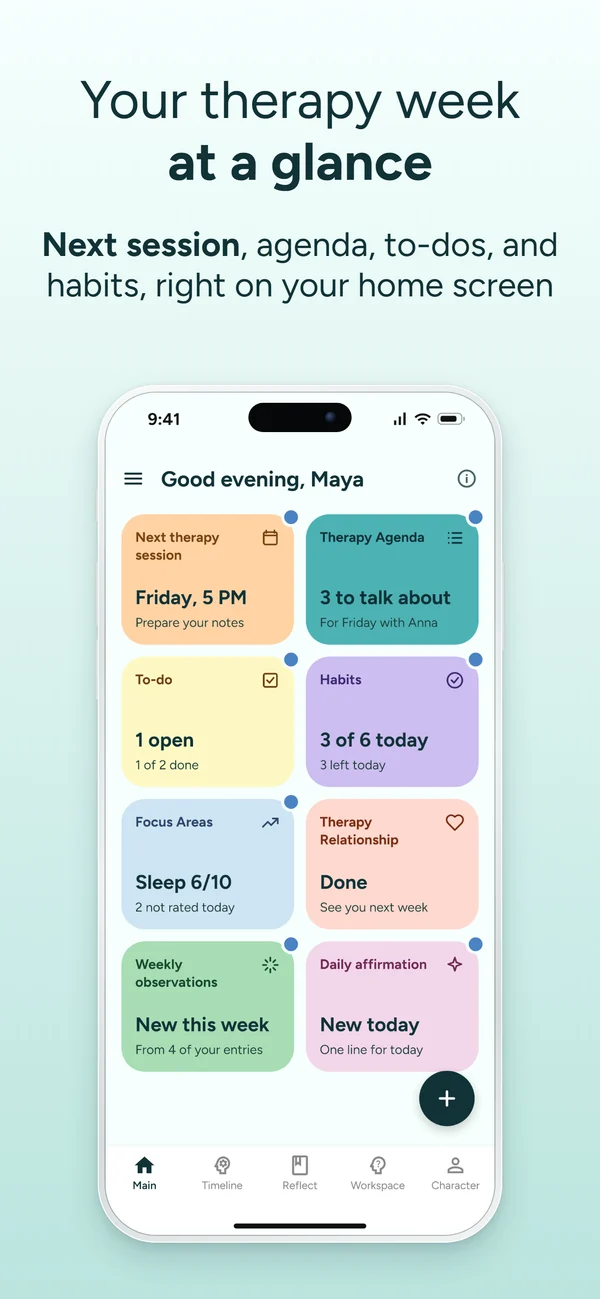
Main home screen
Your week between sessions on one screen, with a blue dot wherever something is waiting. Try it free in MindSync →
A first-week plan for new accounts
New accounts get a wide tile called Your first week: eight small steps, a few minutes each, none of them tied to a day. A step counts as soon as you do what it describes, even outside the plan, and a short "One step forward!" screen marks each one. A daily reminder is optional, and the tile leaves Main once all eight are done. Older accounts don't get the plan. The full list is in how to use MindSync in your first week, step by step.
Before and after therapy cards, rebuilt
The Before therapy card opens with a short Summary and up to three numbered Questions to bring, followed by To-do, Threads, Realizations, Patterns and your Focus Areas. It's made for walking in knowing where to start.
The After therapy card now has a chart called Your progress in therapy, with a status in words: Getting steadier, Holding steady or A harder stretch. It's built from your Focus Areas, notes and recordings, and it appears after three sessions. Until then, you'll see a padlock and a count like 2 of 3. The chart reflects your own entries. It doesn't grade your mental health, and it says nothing about your therapist. Here's what a progress line can and can't tell you.
Timeline and Workspace, tidied up
Timeline has filters at the top: All, Before therapy, After therapy, Reflect, Recording, Between sessions, Realization, Weekly, Monthly and Therapy Relationship. Handy when your therapist asks when something started. Workspace now keeps a fixed order (Next session agenda, To-do, Questions, Goals, Threads, Realizations, Therapy relationship), with the agenda as the one card in color.
Character: strengths that grow from your own words
Character shows what you're learning about yourself, from your notes, talks with Orca and sessions, and it centers on six strengths: Courage, Insight, Honesty, Resilience, Kindness and Commitment. Courage, in the app's words, is "doing or saying the hard thing, even while scared." Strengths grow from moments in what you write and say, so opening the app nine times on the bus earns you exactly nothing. If a moment doesn't sound like you, tap Not quite and it stops counting.
Below them sits a map of the feelings you're working on, like Worry or Calm, with your skills underneath. If those feelings are hard to pin down, start with naming what you feel. A skill moves through four stages (Discovered, Practicing, Growing and Yours), and getting to Yours takes six uses in four different weeks, including one when things were hard. Tools lists the ways of coping you've used, a good start on knowing which coping skills actually work for you. It all fills in as you write and talk. The numbers are a tally of moments, nothing more.
Meet Orca, MindSync's AI therapy assistant between sessions
Orca, the AI you talk to in Reflect, is MindSync's AI therapy assistant for the days between sessions. Orca isn't a therapist and doesn't replace yours. It asks questions, listens, remembers and helps you prepare for your next session.
New accounts meet Orca right after setup: three short questions to get to know you, by voice or in writing, in about three minutes, and then the conversation is yours for as long as you like. A screen called What Orca heard sums it up, and your first Before therapy card starts from there. Past Reflect conversations now open for reading, with a button to continue them. Once your four free days are over, voice talks are part of Premium, and writing stays on Free (see what's free and what's Premium).
What Orca remembers, in Settings
Orca keeps short notes from your conversations so the next one can pick up where you left off, and What Orca remembers, a new page in Settings, lists every one. They're grouped by topic, like On your mind or What helps, and each shows where it came from. Orca uses them in conversations and in Before therapy cards. Delete one with Forget this note, or all of them with Forget everything. Deleted notes are gone for good, and Orca won't learn them again from past conversations, though it may remember something again if you bring it up later. More on what happens to what you tell an AI, and on what to check before you type anything into an app.
What to try first after you update:
- Open Main and tap whatever has a blue dot. It's the quickest way to learn the new layout.
- Add your next session if it isn't there yet. Set it up once, weekly or one-off, and Main helps you prepare the day before and note your takeaways after.
- Open Character and tap Not quite on any moment that doesn't sound like you. It takes corrections without sulking.
- Visit What Orca remembers once (Menu, then Settings) and delete anything you'd rather it didn't keep.
- Take one thing into your next session. Put it on your Therapy Agenda and open with it: "I wrote a few things down this week. Can we start with the one that stuck?" Afterward, open After therapy while it's fresh.
This is what MindSync's new Main is for. Log the to-do your therapist mentioned, the walk you took on Thursday and the question from the shower. Give it time, and the app turns those entries into something you can see: what's waiting today on Main, how your Focus Areas are moving, which strengths keep showing up in Character. Then take your Therapy Agenda into the room, so the hour starts where your week left off.
What's the one thing from your last session you wish had a place to wait for you?
New in this update
- Your first week plan - Eight small steps, a few minutes each, with no set days.
- Character: strengths and skills - Six strengths that grow from what you write and say, plus Not quite for the moments that don't fit.
- What Orca remembers - Every note Orca keeps, in one list you can read and clear.
Frequently asked questions
What's new in the MindSync update?
The MindSync update brings six changes: Main, a new home screen with eight tiles; a first-week plan of eight small steps for new accounts; rebuilt Before therapy and After therapy cards, with a progress chart after three sessions; filters at the top of Timeline and a reordered Workspace; Character, rebuilt around six strengths and a map of skills; and Orca, the AI therapy assistant, with a What Orca remembers page in Settings.
What is Orca in MindSync?
Orca is MindSync's AI therapy assistant for the days between sessions. It asks questions in Reflect, by voice or in writing, keeps short notes so the next talk can pick up where you left off, and helps build your Before therapy cards. Orca isn't a therapist and doesn't replace one. During setup, you can give it a different name.
Is Orca a therapist?
No. Orca is MindSync's AI therapy assistant for the time between sessions. It doesn't provide therapy or replace your therapist; it helps you remember what came up and get ready for your next session. MindSync is not a medical device, and it isn't a crisis service. In the US, you can call or text 988 at any time.
Can I see and delete what Orca remembers?
Yes. MindSync lists the short notes Orca keeps from your conversations on a page called What Orca remembers, which you'll find in Settings. Each note is grouped by topic and shows where it came from. You can delete a single note or tap Forget everything. Deleted notes are gone for good and won't be relearned from past conversations, though Orca may remember something again if you bring it up later.
Do I need to update MindSync to see the new home screen?
Yes. Update MindSync in the App Store or Google Play, and Main, the new home screen, is the first thing you see when you open the app. The new therapy cards, Timeline filters, Character and What Orca remembers come with the same update. The first-week plan and the first conversation with Orca are only for new accounts.
Keep more from every session
MindSync keeps your sessions and the week between them in one place, so your progress stops slipping away. The trial is free, no credit card needed.


Get the app